Search Console Query Groups: What They Show and Hide

Published:
October 28, 2025
Updated:
October 19, 2026
On September 24, 2026, Google added a new search type to the Search Console Performance report for searches made with an image, such as Google Lens and Circle to Search, and said “specific text query data isn’t available for this traffic,” Search Engine Roundtable reported. That leaves more traffic without a query attached, which matters for the AI feature Google added a year ago to make sense of queries: query groups.
Google announced query groups on October 27, 2025, as a feature that “groups similar search queries” in the Search Console Insights report. “The groups are computed using AI; they may evolve and change over time,” Google said, and they “don’t affect ranking,” Search Engine Land reported. As of October 2026, Google’s help page still describes them only inside Insights.
What query groups show
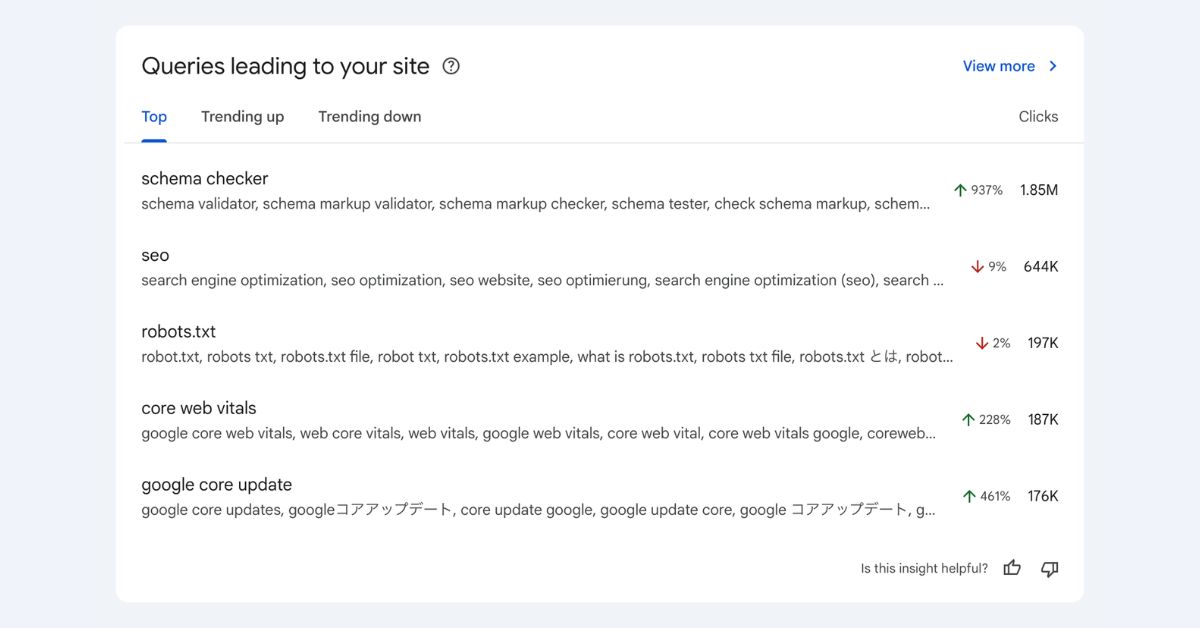
Query groups appear in a card called “Queries leading to your site,” with tabs for the top groups and those trending up or down, Search Engine Journal reported. Google’s help page adds:
- Groups appear only “for sites with a significant amount of query data.” Smaller sites see a simple list of queries.
- “A group is named after the best-performing query within that group,” and its clicks are the total of all queries in it.
- Trending groups are ordered by the change in clicks, “not the percentage change.”
- On sites with many queries, Insights “might not group all of them.”
- Clicking a group opens the Performance report filtered to its queries.
What grouping hides
Anonymized queries. Search Console leaves out queries that aren’t searched by more than a few dozen users over two to three months. Across 887,534 Search Console properties, these anonymized queries accounted for 46.77% of clicks in April 2025, Ahrefs found in a February 2026 analysis. Groups can only contain queries Search Console shows, so a large share of a typical site’s clicks sits outside every group.
Brand against non-brand. Groups mix them. Search Console’s branded queries filter, open to all eligible sites since March 2026, separates them, though Google’s help page warns that “some queries might be incorrectly identified as branded or non-branded.”
AI answers. Clicks from AI Mode are counted in the Web search totals, PPC Land reported. Google’s separate report for AI Overviews and AI Mode, rolled out to all sites on August 31, 2026, shows impressions but no clicks or queries, Search Engine Roundtable reported. Query groups can’t separate clicks from AI answers.
Stability. Because groups can change over time, a group’s trend may reflect regrouping as well as demand.
How to use them with the Performance report
- Use the trending tabs as an alert. Check them weekly to see which topics moved.
- Read the detail in the Performance report. The card shows clicks only, so compare periods, add impressions, click-through rate and position, and switch to the Pages tab to see which URL serves the topic.
- Separate brand demand with the branded queries filter before judging any topic.
- Build stable groups of your own with the Performance report’s custom (regex) query filter, for example question queries starting with how, what or why, or one product line’s terms. Unlike AI groups, these stay the same from month to month.
- Mark changes with annotations on the chart, so a jump can be tied to a launch.
- Go to the API for scale. The Search Analytics API returns up to 50,000 rows per day per search type, Google’s developer guide says, though it may drop some data.
Treat query groups as a fast summary of which topics are moving, and your own regex groups as the record you report on. Setting those numbers against competitors is covered in our guide to SEO benchmarking. Why fewer searches end in a click is set out in our pieces on B2B marketing with fewer clicks and the $750 billion AI search estimate. Turning Search Console data into a plan is part of our search engine optimization and online presence analysis work.
Frequently Asked Questions
What are query groups in Google Search Console?
Query groups are an AI feature in the Search Console Insights report that bundles similar search queries into topics and shows total clicks for each. Google announced them on October 27, 2025. Each group is named after its best-performing query, and tabs show the top groups and those trending up or down. Clicking a group opens the Performance report filtered to its queries.
Why don’t I see query groups in Search Console?
Google shows query groups only for sites with a significant amount of query data. If your site has relatively few queries, the Insights report shows a simple list instead. Google also says the Insights report is being introduced gradually and may not be available to everyone. On sites with many queries, not every query will be grouped, and anonymized queries never appear in any group.
Can I export query groups or get them through the API?
Google’s documentation describes query groups only inside the Insights report, with no export or API access. To analyze a group, click it to open the Performance report filtered to its queries, and export from there. For groups that stay the same over time, build your own with the Performance report’s regex filter, or pull query data through the Search Analytics API and group it yourself.
How are query groups different from the branded queries filter?
Query groups cluster queries by topic, while the branded queries filter splits all queries into branded and non-branded. Both are automated and both can misclassify. The branded filter works in the Performance report and is available to eligible sites, but not to sub-properties or sites with few impressions. Use it first to separate brand demand, then read topic trends in query groups or your own regex groups.